

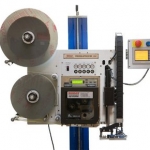
Model 4300e Pro-Apply All-Electric Label Printer-Applicator
Weber’s economical Model 4300e Pro-Apply is an electrically-operated printer-applicator that features the functionality often limited to higher-duty pneumatic systems.
The result is a versatile in-line system that combines high-quality label printing and application that ensures fast, accurate pressure-sensitive labelling – and now it’s available without the need to use externally-supplied compressed air.
• Applies labels up to 6″ wide x 6″ long at up to 12 ips
• Prints text, bar codes and graphic images @ 203, 300 or 600 dpi
• Direct-tamp label application
• Accurate labeling to within ±0.03″
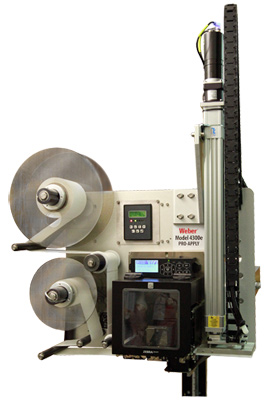
Model 4300e All-Electric Pro-Apply Label Printer-Applicator
The Model 4300e Pro-Apply system is designed and engineered by Weber and is assembled in our own U.S. manufacturing facility. Each unit is equipped with an on-demand, thermal/thermal-transfer print engine from Datamax, SATO or Zebra to produce 203-, 300- or 600-dpi text, bar codes and graphic images at speeds up to 12 ips.
Labels up to 6″ wide and 6″ long are printed in a cost-efficient, next-out mode, and then are instantly applied to cartons or products on the production or packaging line.

Utilising all-electric operation and the direct-tamp method of application, a printed pressure-sensitive label is automatically peeled from its liner and is retained by vacuum on the applicator’s tamp pad. Unlike most conventional print-apply systems, the system’s vacuum is created using electrically-operated fans instead of external compressed air.
The spring-loaded pad is extended up to 12.5″ using an electric actuator travelling at 35″ ips. As the tamp pad approaches the product, a pad-mounted sensor detects the product and slows the actuator to gently apply the label to the package.
Standard features include durable anodized aluminium and stainless steel construction, an integrated user interface with LCD display, numerous inputs/outputs to facilitate the use of a product sensor or other optional accessories and stepper motor-driven rewind.
In addition, system components are readily accessible to ease service, and all units feature zero-downtime connectivity to ensure uninterrupted production.
Options include a stack light and an adjustable stand that enables the system to be oriented for top, bottom or side application.
The Model 4300e Pro-Apply operates with Weber’s exclusive Legitronic® software, which simplifies label formatting, editing and printing.
Weber also manufactures a wide variety of stock and custom pressure-sensitive labels for variable imprinting as well as providing application-specific ribbons for thermal-transfer operation.
Adobe Reader is required to open and view PDF files. This can be downloaded free from adobe.com.
Available Documents
4300EasyGo! TableSideOrder
Summary
EasyGO! TableSideOrder allows servers and waiters to spend 100% of their time on the restaurant floor instead of waiting on line at a POS Station to re-enter an order they’ve already written down at the tableside. When you mobilize your servers and waiters with EasyGO! TableSideOrder they can quickly increase your restaurants revenue and reduce costs. Simply take the customer’s order and enter it at the tableside on easy to handle mobile devices. Add new courses every time you need before closing the order and generating the bill. Without closing the order, change the table and process an order of another customer. Once the order is finished, you’ll be able to charge your customer. Finally, send the orders to the kitchen as needed, several options are possible: via WiFi or cradle, attended or unattended; choose the option that best fits your needs.
View ProductEpson C7500 High-Speed Inkjet Colour Label Printer
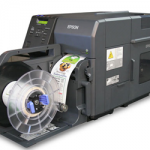
The Epson C7500 inkjet label printer is a fast, full-colour label printer whose rugged design allows minimal maintenance, low cost of ownership, and is ideal for busy, on-demand labelling environments.
The Just-in-Time Colour printing lets you print the labels you need, when you need them, quickly and economically. The C7500 uses durable inks that won’t smudge, smear or fade. And the highly durable labels are up to 50% lower in cost than laser or thermal-transfer printed labels.
View Product
XC4, XC6 – the GHS label printers for two-color printing
Two in-line arranged thermal transfer print units for simultaneous two-color printing in one label.
With ribbon saver at one print unit.
View ProductWeber 5300 – Label printer and dispenser
The new Legi-Air 5300 is a modular Label printer and dispenser distinguished by its extremely versatile applications and a very high operating run time. In addition, the system offers a high degree of operator-friendliness: the operator is supported in his work by several functions such as service interval or operating condition display.
View Product






