

Hospitality
Trade Show In the entrance you use the mobile device to scan the barcode on the ticket and check against a database to see if the ticket is valid. Rent out mobile devices for the booths. The users can scan the badge of the people they talk to. They can add “to do” information to […]

 Trade Show
 Case story: Trade Show
Adobe Reader is required to open and view PDF files. This can be downloaded free from adobe.com.
Available Documents
software-brochure-
-
- Applies label up to 6″ high x 12″ long
-
-
-
- Handles up to 45 products/minute
-
-
-
- Placement accuracy of 0.03″
-
- Supports Tags up to 0.33 mm thick
- High Print Speed of 10 ips
- Large LCD Display
- Prints Brand Names and Logos
- Automated Print-Cut-Stack Function
- RFID Ready
Primary labels / pre-printed labels
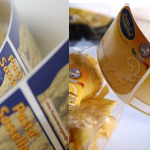
Brands and high-quality products need suitable labels to represent the image and reflect the branding. Weber Marking Systems is geared for the production of high-quality primary and pre-printed labels for any application.
View ProductZebra ZD410 HC
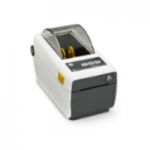
The ZD410 healthcare model offers all of the features of the standard model plus disinfectant ready plastics and an IEC 60601-1 compliant power supply. Designed for hospital, clinic, laboratory and pharmacy applications, the direct thermal ZD410 helps to protect privacy by leaving no record on a ribbon of what has been printed. The optional 300 dpi print resolution is ideal for printing small labels. The ZD410 healthcare model is currently available for purchase only in North America and the European Union countries. It will be launched in other countries throughout 2016.
View ProductWeber 114 One-Sided/Two-Sided Labelling System
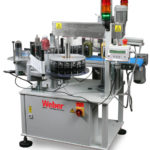
The brand-new Weber 114 system provides a simple, cost-effective solution to low volume labelling for applying labels to one or two sides of a straight-walled product or package. The Model 114 can be added to in-place production lines or operated manually as a stand-alone applicator.
The Weber 114 is easy to use and can be set-up quickly. During application, labels are peeled away from the liner and securely attached to products using the wipe-on label applicators.
The unit boasts robust steel construction making it perfect for lower-volume, intermittent labelling projects or multiple-shift larger-scale operations. This is a very reliable wipe-on application system that is built to last.
View Product
Sato – TG3 High Performance Printer
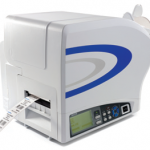
FEATURES







