

EasyGo! POS Pro
Summary
Improve the shopping experience of your customer with EasyGo! POS Pro. Your customer will use a mobile device while shopping and scan the products on the fly. Once your customer is at the cash register, the shopping list will already be in your POS system or printed for be scanned later (at moment of paying, for example). Just do a final review and charge your customer. Easy and fast!

Description
EasyGo! POS Pro is an application designed to make the live of your customer easier. With this application, your customer will be able to:
– Scan the items bought so they are automatically added to the shopping list while they are collected in your shop.
– Review both the items picked and the total price. Correct the shopping list if necessary.
– Avoid long queues at the checkouts, improve customer satisfaction.
In addition to using this application as a queue busting app, it can also be used as wedding or birthday gift-lists. Imagine the process of creating a wedding or birthday gift list. Why looking at huge catalogs? Just let your customer walk through the store and scan the desired products.
Languages
- English
- Spanish
- French
- Dutch
- German
- Italian


Adobe Reader is required to open and view PDF files. This can be downloaded free from adobe.com.
Available Documents
- Choose from 203 and 300 dpi print engines
- Capable of handling print speeds up to 16 ips
- Numerous I/O’s ease interfacing with external device
- Monitor operation via a web browser
- Print and apply labels on a production line in one easy step
- Choose from a wide range of 203, 300 and 600-dpi print engines
- Capable of handling print speeds up to 16 ips
- Numerous I/O’s ease interfacing with external devices
- Monitor the operation via a web browser
- Available with RFID capability
Model 5300 RFID Smart Label Printer-Applicator
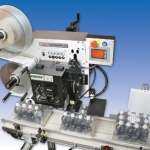
Weber’s exclusive Model 5300 RFID label printer-applicator makes it easy to print, encode, verify and apply pressure-sensitive RFID smart labels to cartons and pallet loads in one automatic operation. In addition, the system determines if a tag is unverifiable and rejects it prior to application.
View Product
Weber LA4050B-EL – All Electric Linear Print Apply System
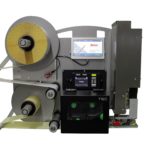
Weber’s LA4050B Series Electric Labelling Print and Apply automated labeling systems feature industry-leading smart technology that use sensors to reduce label application complications, ensuring a one-to-one label-product match. As the leading all-electric Label Printer/Applicator manufacturer on the market, our pressure sensitive labeling systems enable customers to completely replace conventional pneumatic systems with semi-electric and or a fully electric option that controls the label with pinpoint accuracy in side, top, bottom and corner-wrap applications throughout the packaging process.
View ProductEasyGo! In&Out&Dispatch

Summary
Manage your receiving, shipping and warehouse transfers with a simple, customizable and quick application. When completing a receipt and shipping process in a warehouse mainly order number, product ID and involved quantity are required. In the case of warehouse transfers will take place (dispatch) additional information such as source and destination location next to the product ID and quantity are needed. EasyGo! In&Out&Dispatch will manage the registration of incoming and outgoing goods into your warehouse. Additionally it allows an ‘automatic mode’ for receiving, shipping and dispatching; simply read the product barcodes and the application will do the rest!
View ProductModel 5300 Series Direct-Tamp Label Printer-Applicator
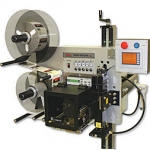
This Weber exclusive Model 5300 label printer application system provides high-resolution printing and high-speed operation combined with the dependable direct tamp method of label application. This method is similar to tamp-blow, but the flexible tamp pad makes direct contact with the product during application.
View Product







