
SATO | NX Series
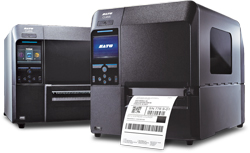
The NX Series is a game-changing innovation that is made easy. It is designed to be so easy to use and maintain that anyone can feel the difference from the day they start using it. The new NX Series comes loaded as standard with many different features to make operation and maintenance easy.
NX Series | Features
SATO‘s first truly Universal industrial label printer engineered for the most demanding printing needs. The new NX Series comes loaded as standard with many features to make operation and maintenance easy for you.

- User-Friendly operation
- Multi-National Language Support
- Multi emulation Support
- Standard multiple On-board Interfaces
- Support for a variety of media types
- Easy Set-up and Maintenance
- High Speed Processing and Throughput
- Space Saving Design
- Superior Print Accuracy and Quality
- Durable Design
User-Friendly Operation
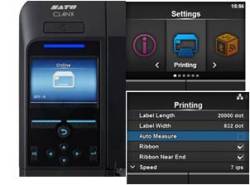
 Blue LED Indicator – Blue confirms normal operation and Red indicates an operation alert. Clearly visible from a distance. Blue LED Indicator – Blue confirms normal operation and Red indicates an operation alert. Clearly visible from a distance.
|
Durable Design
Tough metal housing – Protecting against damage in the field, the NX Series is ready for the toughest of environments.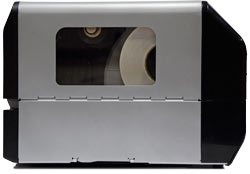
Aluminium Die-Cast chassis – Key parts such as the chassis, front cover, ribbon spindles and print unit are of aluminium die-cast construction to withstand the most challenging environments.
Ribbon Rewinder – Oversized core provides stable rotating torque and reduce a chance of wrinkles while in use of up to 600M long roll.
Wear parts life time – The printhead and platen roller have been designed for double life time operation prolonging intervals between maintenance and reducing operating costs.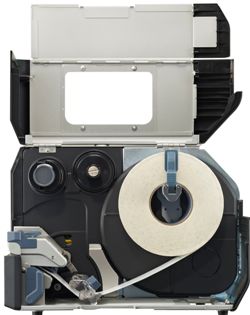
Tool-less Replacement Parts – Provides quick replacement of both the print head and platen roller with no tools required, which helps provide easy maintenance and reduce unwanted downtime.
Features |
||
| – User-friendly operation – Multinational language support – Multi emulation support – Standard multiple on-board interfaces – Support for a variety of media types |
 |
– Easy setup and maintenance – Space saving design – High-Speed Processing & throughput – Superior print accuracy and quality – Durable Design |
CL4NX |
CL6NX |
|
| Print method: | Direct Thermal / Thermal Transfer | |
| Print resolution: | 203, 305 or 609 dpi | 203 or 305 dpi |
| Print width: | 104 mm – 4.1″ | 167.5 mm – 6.5″ |
| Print speed: | 250 mm/s – 10 inch per second 200 mm/s – 8 inch per second 152 mm/s – 6 inch per second |
250 mm/s – 10 inch per second 200 mm/s – 8 inch per second |
| Emulations: | Auto detect: ZPL – IPL – TPL – DPL |
Adobe Reader is required to open and view PDF files. This can be downloaded free from adobe.com.
Available Documents
Furniture Polish Labels

When creating a family of furniture care products such as conditioners and oils, be sure to let the customer see exactly what they will be putting on their expensive wooden treasures. By using clear labels and containers, the buyer can see the products inside, showing your quality ingredients. And since your customer will be concerned about the ingredients, your label needs to show caution information and detailed instructions.
View ProductZQ500 SERIES Mobile Printers
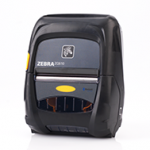
Extreme environments and bangs and bumps are no match for these lightweight, compact printers. Zebra’s ZQ510™ and ZQ520™ printers are the most rugged printers available. They perform in the widest operating temperature range in the industry and can withstand repeated drops to concrete from up to 6.6 feet. Water spray is no match with their IP54 rating. Featuring Zebra’s Link-OS® environment, these premium printers are easy to integrate, manage and maintain. With large buttons and a user-friendly interface, they are easy to operate, even when wearing gloves.
View ProductX1Jet XR
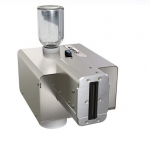
The X1JET XR inkjet printer is a stand-alone printing system that uses an XR Class piezo printhead. The printhead, ink system, maintenance station, and control electronics are all housed in one compact all-in-one device. Three different versions are available for different applications: in the Compact version, the printhead is mounted for horizontal marking. The Vario version printhead may be rotated 90 degrees anti-clockwise for added flexibility. The printhead is connected to the ink system via a 1000mm long hose in the Top version, which provides greater flexibility.
The oil-based XR 980 ink is ideal for printing on both mildly absorbent and absorbent product surfaces. Its quick drying period makes it ideal for printing on painted folding boxes.
View ProductmicroFlash 2te
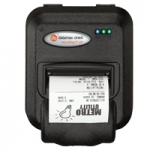
The microFlash 2te is the industry’s most rugged and reliable 2-inch wireless portable printer, in addition to being the smallest. In fact, the 2te is up to 33% smaller its nearest competitor! The 2te printer will dramatically increase the efficiency and productivity of your workforce, and ensure that “printer failure” is a term that is rendered nearly obsolete. A grueling series of tests prove the 2te’s ability to withstand the most punishing physical abuse. As for performance, the printer’s processor is so fast that it rivals the output time of portable printers that claim to have twice the print speed. The 2te is also easy to integrate into new or already established applications. It utilizes USB, and is compatible with today’s handheld terminals and laptops. The 2te can be managed through many software packages.
View Product