

QuickScan QD 2400
Due to the popularity of 2D barcodes across all market segments of the data capture industry. Datalogic have developed the QuickScan QD 2400 corded imager to meet the high demand for the 2D barcode reader. The QuickScan™ QD2400 2D imager was specifically created to address the needs of retailers and meet the market demand with […]
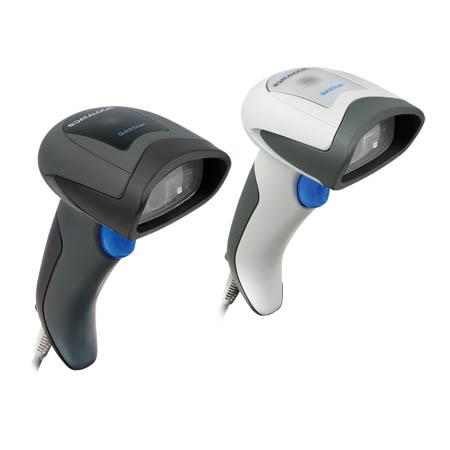
Due to the popularity of 2D barcodes across all market segments of the data capture industry. Datalogic have developed the QuickScan QD 2400 corded imager to meet the high demand for the 2D barcode reader.
The QuickScan™ QD2400 2D imager was specifically created to address the needs of retailers and meet the market demand with outstanding one directional reading performance on virtually all codes at an affordable price. The QuickScan is elegant yet durable and balanced with a lightweight enclosure.
The QuickScan is ideally suited for applications at the point-of-sale (POS), the QuickScan QD2400 imager features a new illumination and aiming system developed with the unique intent to reduce visual stress of the operator during the daily scanning activities. It consists of a soft, dark red illumination combined with two blue LED triangles pointing at the targeted bar code, resulting in a precise aiming system which contributes to low eye fatigue, yet still allows top operator efficiency.
The QuickScan QD2400 imager reads typical printed linear bar codes as well as complex 2D bar codes displayed on the screen of a mobile device or loyalty cards. The QD2400 imager provides a fast, reliable scan from an elegant and robust 2D imager.
Imaging technology meets or exceeds the productivity compared to laser scanners and provides the additional advantages of a lower cost-of-ownership and greater product reliability over the long term.
Features
- Outstanding snappiness
- Omnidirectional reading
- Reduced visual stress with LED-based aiming system
- Datalogic’s patented ‘Green Spot’ technology for good-read feedback
- Advanced motion tolerance optics
- Host download capability ready
Adobe Reader is required to open and view PDF files. This can be downloaded free from adobe.com.
Available Documents
QuickScan QD2400Alpha Compact Pre-Printed Labelling System
Our Alpha Compact Range of Labelling Systems, Compact, Lightweight, Durable and Easy to Use.
View ProductPrimary labels / pre-printed labels

Brands and high-quality products need suitable labels to represent the image and reflect the branding. Weber Marking Systems is geared for the production of high-quality primary and pre-printed labels for any application.
View ProductA+ and XD Label Printers
Regardless of whether the A+ printer is operated as a stand-alone solution, a PC application or in a network, it is always up to the mark! The high-speed processor ensures fast job processing and immediate label output.
View ProductZebra LS2208 Handheld Scanner
The Symbol LS2208 handheld scanner from Zebra offers high performance scanning at a moderate price point. From the retail point-of-sale and backroom to the patient bedside or school book checkout, the Symbol LS2208 provides fast, reliable scanning in a durable, lightweight form factor, delivering enhanced productivity and efficiency while reducing your total cost of ownership (TCO). With aggressive scanning capabilities and a wide working range, the Symbol LS2208 accurately captures data fast, helping employees work quickly and efficiently. And you’ll be up and running fast, because the Symbol LS2208 is easy to deploy and use, thanks to its plug-and-play installation and intuitive, user-friendly design, which requires little or no training. Plus the ergonomic, balanced form factor reduces user fatigue to maximize user comfort.
View Product






