

Epson C7500 High-Speed Inkjet Colour Label Printer
The Epson C7500 inkjet label printer is a fast, full-colour label printer whose rugged design allows minimal maintenance, low cost of ownership, and is ideal for busy, on-demand labelling environments.
The Just-in-Time Colour printing lets you print the labels you need, when you need them, quickly and economically. The C7500 uses durable inks that won’t smudge, smear or fade. And the highly durable labels are up to 50% lower in cost than laser or thermal-transfer printed labels.
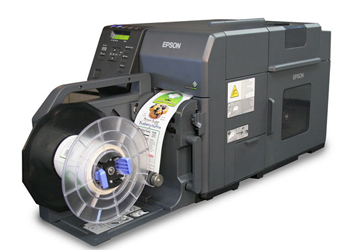
Features include:
• PrecisionCore TFP printing with Nozzle Verification Technology
• BS-5609 certified for durability
• Prints labels up to 4.1″ wide
• Uses high-yield ink cartridges that are easy to change
• Fast print speeds of up to 11.8″ per second
• Optional label rewinder for distributed applications
High-speed colour label printing
If you are looking for high-speed, in-house on-demand colour label printing, the Epson C7500 is for you. With durable smudge-resistant inks, this printer can crank out labels at up to 11.8″ per second.
Its astounding image quality is a result of the PrecisionCore inkjet technology that Epson uses to deliver precise barcodes and ultra-sharp text. And the built-in Nozzle Verification technology constantly checks for clogged nozzles and halts printing to clean nozzles when needed.
The highly efficient printer uses high-yield ink cartridges so there are fewer interruptions and less down-time during print cycles. The ink cartridges are easy to replace and a lot simpler to use than thermal-transfer ribbons or laser toner. The C7500 is up to 50% lower in printing costs versus laser or thermal-transfer printers printing the same labels.
With the built-in ESC/Label language capabilities, you can use the printer with your existing workflows and even add colour with simple programming extensions.
Adobe Reader is required to open and view PDF files. This can be downloaded free from adobe.com.
Available Documents
Epson C7500 High-Speed Inkjet Colour Label PrinterAlpha Quadro Label Applicator
The right label at the right time
View ProductTest Sub Category
Test
View ProductSATO | NX Series
The NX is SATO’s universal printer range engineered for the ultimate operator experience, and is skilfully crafted to support new and legacy printing applications across a wide range of verticals that would require a durable and dependable printer for years to come.
View ProductI-Class Mark II
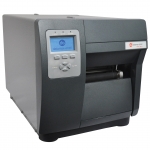
We made the best better.
Datamax-O’Neil’s I-Class revolutionized the barcode printer industry with its award winning modular design, field installable options and rugged reliability.
View Product






