

EasyGo! PODLite
Summary
Manage your deliveries with a simple, customizable and powerful proof of delivery solution. EasyGo! PODLite allows for adding additional comments at the point of activity ensuring the highest customer satisfaction. In addition to the delivery registration EasyGo! PODLite also incorporates the registration process for collecting packages from the costumer site at the very same moment the operator delivers the packages.
Description
EasyGo! PODLite manages your deliveries easily and securely.
Once the POD terminal is filled with the relevant basic information such as Delivery Id, Address, Number of Packages the delivery can start! You can start delivering your packages now! Optionally it is possible having detailed information on the content of each package available for the operator should this it be required to match security or delivery instructions.
When starting the delivery process the operator will see a complete overview on all deliveries to do, sorted on predefined settings by the host/planning system. When the operator arrives to the delivery destination, he only needs to verify the delivery data, add comments if necessary, i.e. ‘missing box’ (the comments can be predefined in a master file), and asks the customer’s signature as proof of delivery.
EasyGo! PODLite is simple to setup as it only needs one single master file with the basic information of the all deliveries to do. If it is required for the delivery process additional information can be provided to the operators such as:
– Details of each package for each delivery, package code and description, delivery instructions
– Warnings and comments.
At the point of activity EasyGo! PODLite allows also for collecting packages as it includes a process to add new activities easily. Just enter the name or customer ID, address details, number of packets and the signature of your customer (optional) and the collection is created!
Finally, upload the register of your deliveries to the host via cradle or Wi-Fi.
Languages
English
Spanish


Adobe Reader is required to open and view PDF files. This can be downloaded free from adobe.com.
Available Documents
A – Class, Mark II Print Engine
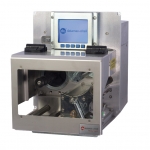
When the demands of your high performance print and apply application require more features than existing print engines offer, it’s time to move up to the A-Class™ Mark II. The A-Class Mark II family of advanced print engines is designed for high-demand multi-shift applications requiring fast throughput and proven reliability. It includes a number of innovative design features such as stainless steel hardware components, a modular design for enhanced serviceability, coated side in/coated side out thermal transfer ribbon assembly, a full graphics display, intuitive menu navigation, and an optional remote display.
View ProductDS6878-HC HEALTHCARE SCANNER
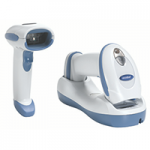
Prevent medical errors, improve patient safety and increase caregiver productivity. The DS6878-HC cordless imager from Zebra enables hospitals to automate data capture, improve data accuracy, increase productivity and streamline everyday processes in patient rooms, admitting, laboratories and the pharmacy. Its matchless feature set meets the unique requirements of healthcare facilities. An intuitive and ergonomic design combines with dependable and rapid capture of barcodes and other images, allowing caregivers to remain focused on the patient — not the technology. The DS6878-HC is compatible with popular Bedside Meds Administration software including Cerner, Epic, Siemens, Eclipsys and Meditech.
View ProductTrident
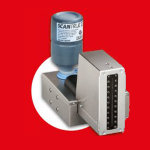
Trident is perfect for text, barcode and graphic marking on absorbent and smooth surfaces.It is easy to use, highly reliable and can reach printing speeds up to 60 meters per minute.
Click on the Direct Sales Button, and contact us today to order your Trident inkjet thermal inks.
View ProductBasic Fast Inspector
Summary
Inspection program is ideal for fixed assets or high-value items – such as automobiles, construction equipment or plant maintenance and tooling equipment.
View Product






