

Axicon Pharmacode Verifier- 6000-W
The Axicon 6000-W White Light Pharmacode Verifier… was designed specifically to meet the requirements to verify the “Pharmacode” (commonly called the “Laetus” Code) within the Pharmaceutical Industry. This Verifier uses a white light source in order to capture all bars regardless of colour. This is an essential tool for all designers and printers of pharmaceutical packaging.
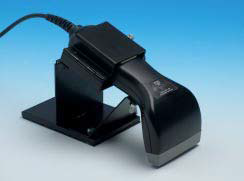
• Captures all Coloured bars
• Automatic bi-directional decode
• Suitable for both Standard Code and Mini Code
• Product Look-Up
• Dimensional Measurements
• Nominal Width Measurement
• Bar Measurements
• Scan Profile
• Visual reconstruction
• Free Software Updates for life
Adobe Reader is required to open and view PDF files. This can be downloaded free from adobe.com.
Available Documents
Axicon 206000-W barcode verifier- High Speed Throughput
- 203 / 305 dpi
- 4 and 6 inch Print Width
- Multilingual Display
- Flexible Connectivity
- Powerful Memory
- Windows® Compatible
- RFID Ready and Upgradeable
Sato CL4e / CL6e Printers
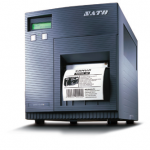
FEATURES
Sunscreen Labels
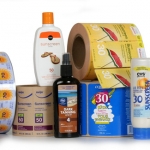
Everyone uses sunscreen these days whether at the beach, playing sports outdoors, or at a family picnic. But how do you make your sunscreen product stand out from the hundreds of others on the store shelf? A simple, clean label design on a unique shaped container is the best way to get noticed. Bright colors and large characters for the SPF number are important considerations.
View ProductA – Class, Mark II Print Engine
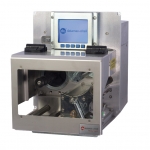
When the demands of your high performance print and apply application require more features than existing print engines offer, it’s time to move up to the A-Class™ Mark II. The A-Class Mark II family of advanced print engines is designed for high-demand multi-shift applications requiring fast throughput and proven reliability. It includes a number of innovative design features such as stainless steel hardware components, a modular design for enhanced serviceability, coated side in/coated side out thermal transfer ribbon assembly, a full graphics display, intuitive menu navigation, and an optional remote display.
View ProductZebra LI2208 Barcode Scanner
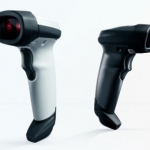
The LI2208 represents the next generation in 1D scanning and builds on our most popular scanner ever, the LS2208. You get the same reliability and ergonomics of the LS2208, combined with enhanced features such as extended range and support for mobile bar codes. With our best-in-class linear imager, you can count on unparalleled scanning performance on every bar code, every time. A patented single circuit board improves reliability by eliminating connectors and ribbon cables, which are the most common points of failure. You can drop it and use it in dusty and damp environments — and still expect reliable operation.
View Product






