

Zebra DS457 SERIES Scanner
Enable high-volume hands-free scanning from the retail POS and airport boarding gate to the manufacturing production line with the Zebra DS457. With comprehensive data capture, your workers can scan virtually any bar code — including 1D, 2D and direct part marks. No matter what type of bar code is presented, or whether it is printed on a paper label, etched into a product or displayed on a mobile phone screen, breakthrough digital imaging technology delivers extraordinary scanning speed. The tiny footprint fits in the most space constrained areas. Workers can choose presentation or trigger-activated mode, providing the flexibility for a wide variety of applications. And while the DS457 can be integrated into a wide variety of products, its sleek design is just as at home
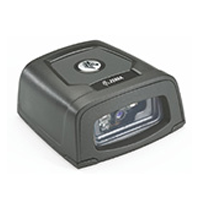
With stunning performance on virtually every bar code — 1D and 2D plus direct part marks — your workers can capture bar codes as fast as they can present items for scanning. There is never a need to pause between scans, protecting productivity.
The tiny DS457 is ideal where a zero or minimal footprint is required. At just 1.15 in. H x 2.3 in. L x 2.44 in. W (2.92 cm H x 5.84 cm L x 6.2 cm W), this device can be mounted just about anywhere — attached to the register or under the counter for a true zero footprint on the retail cash-wrap to a space-constrained manufacturing cell or airport gate.
Your customers are rapidly adopting mobile bar codes — electronic versions of tickets, boarding passes and loyalty cards that can be carried right in the mobile phone. Since the DS457 can read bar codes on mobile phone and computer displays, you’re ready for this next generation bar code, protecting customer convenience, customer service quality and employee productivity.
The DS457 can be used as a standalone scanner or integrated into the most space-constrained products to bring world-class scanning performance to mobile computers, handheld scanners, self-service kiosks, medical and diagnostic instruments, lottery terminals and more. Integration into your product designs is easy — there is no optical, mechanical or electrical engineering required. And in the event you already have a Zebra Miniscan deployed today, the common interface allows you to simply swap scanners to cost-effectively boost scanning performance and quality — no re-tooling or redesign of the installation area are required.
Adobe Reader is required to open and view PDF files. This can be downloaded free from adobe.com.
Available Documents
zebra ds457- Heavy Duty Industrial Construction
- Semiconductor / Electronics
- Variable Print Resolution
- Windows Compatible
- Powerful Memory
- Easy Connectivity
- Semiconductor / Electronics
- Dual LAN System
- Fastest in the Market
- Large LCD Display
- Easy to Navigate Menu
- User Configurable Print Head
- RFID Ready and Upgradeable
- No PC Required
- Tri-Interface Port
- Built to Last
Sato M84Pro Heavy Duty Industial Printer
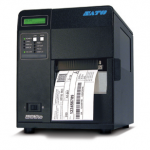
FEATURES
Sato GT4e High Performance Industrial Printing
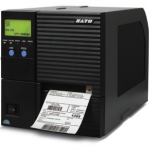
FEATURES
Axicon 7025-S Barcode Verifier
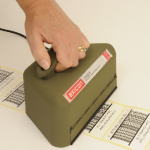
The Axicon 7025-S verifier is designed for all barcodes where an 8, 10 or 20mil aperture is mandatory (such as GS1-128 and ITF-14), up to 195mm width including quiet zones. The simple to use design reduces user error and eliminates product damage whilst providing the highest level of accuracy achievable for verification.
View ProductAxicon PV-1072 Portable Barcode Verifier
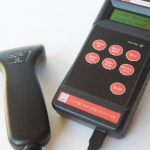
Once more Axicon has used its innovative skills and detailed knowledge of the barcode quality market to offer you the best in portable barcode verification. Introducing the Axicon PV-1072 – the ideal hand-held portable barcode verifier. Whether your priority is compliance, accuracy, reliability, ease of use, capability or cost this verifier ticks all of the boxes. Everything is geared to making the job easier – which means the job gets done quicker.
View Product






