

Working Apps’ Tray Trace
Summary
Tray Trace is the effective answer to the management of re-useable containers. With the use of unique identifiers for each tray, container, roll cage, IBC, transit tank, barrel, gas bottle, potato box or pallet means these can be scanned on delivery, collection and at base to provide an accurate record of the container’s use and current location. Re-usable containers are environmentally friendly if re-used; where are they going to, and who is losing and not re-using costs a business both monetarily but also in loss of resources. Further Tray Trace lets you record the condition of the container, its temperature and free text as an option.
Description
Tray Trace has been designed to be flexible so that the application can be simply tailored to the customer’s requirements. 2D barcodes are recommended for their durability, but 1D will also work.
The user signs on either using a user name or as a vehicle run.
The user once signed on; can deliver, collect or check trays by scanning unique barcodes on the trays. Optionally Tray Trace lets the user record the condition of the tray as a drop down list, and or other factors such as temperature, as well as a free comment field.
On collection the tray returns to the user or route, optionally recording the condition.
A full stock check of trays at depot can be made, or a single check for its location.
The output is a list of trays their location and optionally condition, so that the owner knows where the re-usable containers are “resting”, and if required who to call to get them back.
Languages
- English

Adobe Reader is required to open and view PDF files. This can be downloaded free from adobe.com.
Available Documents
- Print and apply labels on a production line in one easy step
- Choose from a wide range of 203, 300 and 600-dpi print engines
- Capable of handling print speeds up to 16 ips
- Numerous I/O’s ease interfacing with external devices
- Monitor the operation via a web browser
- Available with RFID capability
HP (Hewlett-Packard)
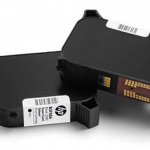
Hewlett Packard is a printhead suitable for marking almost any product at high resolution.
Click on the Direct Sales Button, and contact us today to order your HP inkjet thermal inks.
View ProductZebra ZXP Series 8 Retransfer Card Printer
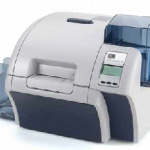
With best-in-class, productivity boosting, full-throttle throughput, produce vivid color plastic cards on demand fast – thanks to Zebra’s highly advanced ZXP Series 8 retransfer card printer and its patent-pending image-transfer process. Yet even at unparalleled print speeds, the printer achieves superior, photo-like image quality that boasts rich, consistent colours and strikingly sharp resolution.
The ZXP Series 8 printer includes ZMotif XML-based software for easy integration with enterprise applications. A modular design gives you the flexibility to add a variety of encoding options as needed.
View ProductAxicon 7015 Barcode Verifier
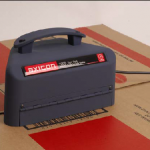
The Axicon 7015 combines CCD based hardware and state of the art application software, conforming to the latest ISO/ANSI print quality standards (ANSI x3.182 and ISO/IEC15416-1). Our equipment has been independently tested and conforms to ISO/IEC15426-1. The Axicon 7015 is designed for all barcodes where an 8, 10 or 20mil aperture is mandatory (such as GS1-128 and ITF-14), up to 195mm width including quiet zones. The simple to use design reduces user error and eliminates product damage whilst providing the highest level of accuracy achievable for verification.
View ProductModel 5300 Series Direct-Tamp Label Printer-Applicator
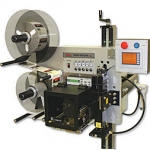
This Weber exclusive Model 5300 label printer application system provides high-resolution printing and high-speed operation combined with the dependable direct tamp method of label application. This method is similar to tamp-blow, but the flexible tamp pad makes direct contact with the product during application.
View Product







