Warehousing

Warehousing & Manufacturing
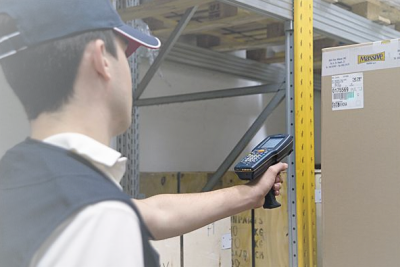
Warehouses and manufacturing plants can become much more efficient with a mobile solution. Scanning barcodes instead of writing on paper makes your personnel work faster and fewer errors are made.
Warehousing software has the functions: Inventory counting, Picking, Stock moving, Print (shelf label), Receiving. You can upgrade the solution with functions like: Serial number scanning, Ordering, Product information, traceability, damaged goods, shelf placement management etc.
Warehousing
Warehousing Software
Walkthrough
Warehouse Walkthrough

Adobe Reader is required to open and view PDF files. This can be downloaded free from adobe.com.

Available Documents

software-brochure

    Pressure-Sensitive Automotive Parts Labels

    automotive-labels

    Heavy-duty labels that look good. Labels used in the automotive parts industry have to be tough to stand up to the harsh environments where they are used. But that doesn’t mean they can’t look good, too. Bright, colorful consumer parts labels need to add life and value to your packaging while OEM parts need durable […]

    View Product

    Zebra ZD410 HC

    The ZD410 healthcare model offers all of the features of the standard model plus disinfectant ready plastics and an IEC 60601-1 compliant power supply. Designed for hospital, clinic, laboratory and pharmacy applications, the direct thermal ZD410 helps to protect privacy by leaving no record on a ribbon of what has been printed. The optional 300 dpi print resolution is ideal for printing small labels. The ZD410 healthcare model is currently available for purchase only in North America and the European Union countries. It will be launched in other countries throughout 2016.

    View Product

    EasyGo! BedSideOrder

    Summary

    From the patient’s hospital bedside straight to the kitchens with EasyGo! BedSideOrder! Use this quick and easy application to help your nursing staff take meal orders from the patient’s bedside and send them straight to the hospital’s kitchens in just a few simple clicks. Safeguards can be applied to help the nurses avoid meal options that could be harmful for the patient, and comments can be added to individual orders.

    View Product

    Geset 117 Top and Bottom Labelling System

    The Geset 117 labelling system is used to label square products on the top and bottom side automatically. Depending on the type and dimension of the product, different label sizes are used. The products are fed manually or by a conveying system provided by the customer at an infeed passage on the labelling system. Care should be taken on accurate alignment of the products. It is essential that the products are forwarded separately to the applicator with a gap between each other.

    When the light barrier is reached, an application trigger is tripped. Both label applicators apply then in Wipe On procedure a label onto the product. The label on top side is pushed on the product by a brush or roller. The label on bottom side is pushed on the product by the self-weight of the product. After labelling the products move on and can be removed from conveyor by the customer.

    View Product

CTA Form