
SATO TG3 | Retail Tag & Label Printer
This series of retail SATO printers include a heavy duty print mechanism and cutter assembly which carries on the tradition of durability and performance of SATO solutions.
TG308 | TG312 – SATO’s new specialty series of printers
This series of retail SATO printers include a heavy duty print mechanism and cutter assembly which carries on the tradition of durability and performance of SATO solutions. With its industrial chassis and high performance processing, it tackles even the most demanding print jobs with supreme ease. Tags and labels automatically load with a touch of a single button, while sensors automatically calibrate gap or reflective markings ensuring proper print registration.
| Print Method: | Direct or Thermal Transfer |
| Print Resolution: | 203 or 305 dpi |
| Print Width: | 3.1″ |
| Media Width: | 0.9″ to 3.1″ (label) 0.9”-3.3” (tag) |
| Print Speed: (max.) | 10 ips |
|
Accessories
Applications
Industries
|


Adobe Reader is required to open and view PDF files. This can be downloaded free from adobe.com.
Available Documents
cZebra ZD410
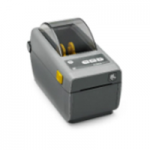
The ZD410 is the smallest printer in its class, fitting easily in the most space-constrained desktop or shelf. Available with either 203 dpi or 300 dpi print resolution, the ZD410 is ideal for printing labels with a shelf life of less than one year. The ZD410 is currently available for purchase only in North America and the European Union countries. It will be launched in other countries throughout 2016.
View ProductZebra PAX 4™ Series Print Engines
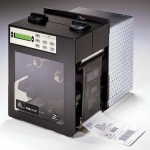
Versatile, Four- and Six-Inch-Wide – OEM Print Engines PAX 4™ print engines deliver superior performance and reliability. The 110PAX4 and 170PAX4 print engines are the performance leaders in mission-critical print-and-apply applications. With enhanced connectivity, including wireless and Ethernet, along with all-metal construction
View ProductMC3200 Mobile Computer
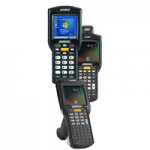
Redefine productivity and reliability with the MC3200 mobile computer, the next generation in the class-leading MC3000 Series, now with more options to meet your needs. Choose the right operating system for your business – Android Jelly Bean or Microsoft Embedded Compact 7. Your choice of our most advanced 1-D laser or 1-D/2-D imager scan engine allows your workers to easily capture barcodes in any condition.
View ProductLegi-Air 5300
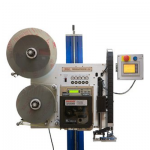
Label printer and dispenser for all labelling tasks
The new Legi-Air 5300 from Bluhm Systems is a modular Label printer and dispenser distinguished by its extremely versatile applications and a very high operating run time. In addition, the system offers a high degree of operator-friendliness: the operator is supported in his work by several functions such as service interval or operating condition display.
View Product