

Booklet Labels
Many products, especially medicines and nutraceuticals, need to provide additional information to their customers regarding dosage and safety concerns. While space on a container is limited, you can get around that limitation by using a booklet label.
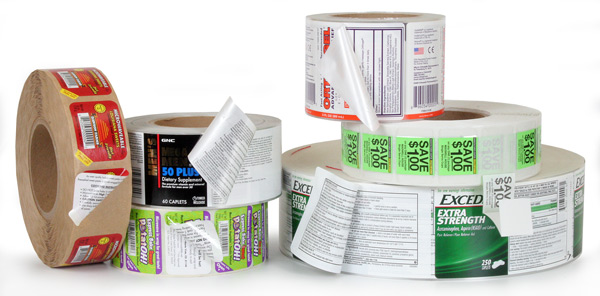
Give your customer the all the information they need with extended text labeling.
Weber can help you decide on the right type of label and materials that will look great and yet be durable enough to take repeated use and re-closing of the labels.
Extended Text Label Tips
Materials:
- Booklet labels are tricky and require testing to make sure they will work the way you want them to. Plan ahead and check all your options.
- Be sure to use label materials that will stand up to damp and abrasive conditions as well as frequent handling of the booklet label.
- Always test your label adhesives to make sure they will stick securely to your containers, especially plastic bottles and curved shapes.
Artwork:
- While you can get a lot of text onto a booklet label, make sure you have it proofread thoroughly to avoid costly mistakes.
- Make sure your label indicates that more information is available underneath!
- Use a die cut shape or other device to make it easy for people to peel-open the label. Take into consideration the elderly if they will be using it.
- Add a QR code so your customers can interact with your company, get coupons, and more.
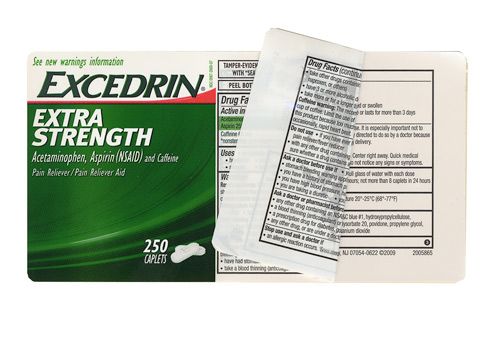
Excedrin Booklet LabelThis pain-reliever label opens to add two pages of Drug Facts about the product. The long-lasting adhesive on the outside edge keeps the resealable flap working. The label is printed on a glossy white film which makes it virtually impossible to accidentally tear when opening. Label Size: 5.75″ wide x 3.0″ high Facestock: Glossy white film Print method: Flexo Top Coat: None |
 |
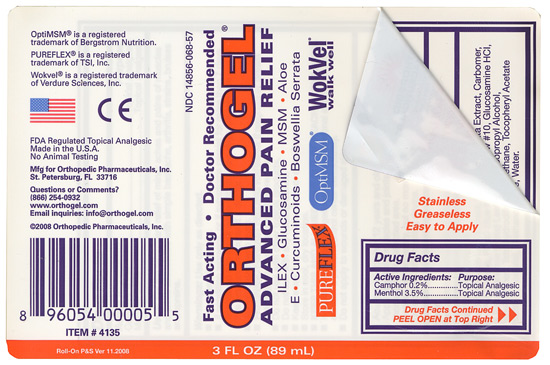
Orthogel Booklet LabelsThis label is another prime example of needing additional space for Drug Facts information. By printing on the back inside page, they were able to put all of their warnings and directions in one place. Another advantage of putting this info inside the booklet is that it will be protected over the years from abrasion and abuse that might render it unreadable. Label Size: 4.75″ wide x 3.25″ high Facestock: Glossy white film Print method: Flexo Top Coat: None |
 |
Adobe Reader is required to open and view PDF files. This can be downloaded free from adobe.com.
Available Documents
X4Jet Plus
With the new high performance Markoprint X4JET print controller, different inkjet printing technologies can be controlled either simultaneously or alternately. The intuitive input unit of the new high performance Markoprint X4JET plus print controller is a boost to operator convenience. All system parameters can be entered easily and quickly, to be stored and called up later.
View ProductZebra ZT400 Series Printers
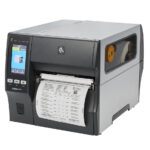
The ZT400 Series builds on the field-proven reliability of the Z Series with advancements in print speed, print quality and connectivity options. Designed for ease of use, the ZT400 Series printers offer an intuitive icon-based LCD graphical user interface and easy supplies loading. And, they include standard USB, Serial, Ethernet and Bluetooth® capabilities. Expanded RFID capacities deliver greater tracking abilities, deeper visibility and enterprise insights.
View ProductEpson ColourWorks™ C3500 Inkjet Colour Label Printer
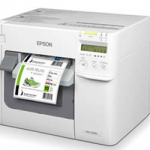
The perfect colour printer for GHS and medical device labels.
Now you can dramatically reduce colour label costs, increase operational efficiencies and quickly produce high-quality colour labels with Just in Time ColourTM printing on Epson’s high-speed ColourWorks C3500 Inkjet Label Printer. This compact inkjet printer is perfect for in-house on-demand printing of small GHS chemical labels, short run food labels, medical device labelling and more.
View ProductPharma / Nutraceutical Labels

The demands for traceability and counterfeit detection are correspondingly high for medicines. Many regulatory bodies in many countries need to be adhered to including the FDA (Food and Drug Administration), IFAH (International Federation for Animal Health), EFPIA (European Federation of Pharmaceutical Industries and Associations) and others. Quality assurance requires that the marking systems implemented in a Track & Trace system shall be absolutely accurate and function reliably. Text and codes must ultimately be perfectly legible when checked visually.
View Product






