

Axicon 7025-S Barcode Verifier
The Axicon 7025-S verifier is designed for all barcodes where an 8, 10 or 20mil aperture is mandatory (such as GS1-128 and ITF-14), up to 195mm width including quiet zones. The simple to use design reduces user error and eliminates product damage whilst providing the highest level of accuracy achievable for verification.
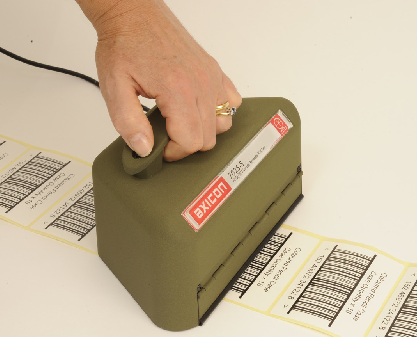
Traded Pack level (Warehouse) barcodes whether being verified on cartons, labels, corrugated board, shrink wrap film etc plus all pallet labels and linear barcodes of a similar size.
The “S” range of Axicon verifiers has a “Continuous Scan” feature. Just place the verifier over the barcode, press the trigger and slide the verifier over the code – in less than a second you can have results averaged over more than 150 scans of the code at different points in the bar height
Adobe Reader is required to open and view PDF files. This can be downloaded free from adobe.com.
Available Documents
Axicon 7025-S barcode verifier tech sheetLS3408-FZ Scanner
HIGH-PERFORMANCE SCANNER WITH FUZZY LOGIC
Premium scanning for all 1D codes including poorly printed, damaged or low contrast bar codes or fast and accurate reading of damaged, dirty and poorly printed barcodes typically found in industrial environments.
View ProductEpson GP-C831 Printer
Our newly developed printhead protection system protects the ink head from dust to ensure reliable, continuous printing. In addition, Epson’s advanced DURA Brite pigment inks deliver outstanding stability and resistance to water, chemicals, fading and smudges. KEY FEATURES GHS label printer Ideal for large labels including large format drum and chemical labeling BS5609 certified Complies […]
View ProductMarkoprint X1JET HP HandHold
The Markoprint X1JET HP HandHold inkjet printer is a versatile, mobile, industrial, small character inkjet printer. The X1JET HP HandHold is battery operated and will print high resolution text and images without being fixed to a production line. The long-life battery allows you to print over an extended period of time. Configuring the device and uploading of print images is a simple task using a USB stick and the Markoprint iDesign software.
View Product
Performance Series
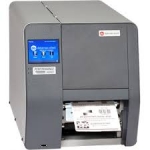
The Datamax-O’Neil p1120n Near Edge Performance Printer offers a unique near-edge printhead that allows full use of the label giving customers the ability to design and code barcodes that support detailed information. The flexible multimedia printing allows labels to be printed on synthetics, tags, self-adhesives and plastics. The near-edge printhead gives users the ability to integrate barcode printing across a wide variety of applications. The p1120n also offers auto-loading capabilities, a user-friendly touchscreen, and uses industry standard PCL printer language making it easy to integrate.
View Product






