

EasyGo! PriceMark-Down
Summary
Print more labels, with or without changing the price, with this easy and quick app. Choose whether or not to use the item master file to load all products information and read or write (using barcode labels or not) the items to print the labels. Send it to the printer by Bluetooth, WiFi, or serial connection and already you have the labels! Finally, send too the report file to have a movement report.
Description
Wasting hours and hours to execute price markdowns?
Tired of re-entering your price changes into your POS software?
Want to increase customer satisfaction with a up to date price-tags on your products?
Easily Go For EasyGo!PriceMark-Down AppSource application as it allows for checking any type of stock, reset the price and print new price labels on a Zebra mobile label printer
The retail shop’s operator needs to enter the new price and the number of labels he wants to print. By default the master price is displayed eliminating the change of wrong prices being entered
All other properties related to the product are not changed such as the product code, the description and EAN barcode number, if provided
The process in this Price Mark-Down App is made so easy as the operator only confirms the price and number of labels needed and the handheld device will print the new price label by cable, WiFi or Bluetooth connections to the Zebra printer. It’s possible to use several label formats, so the user will be able to choose the right label to print if more than one label format is available (for example, location label, price label…)
One label format is supplied with the solution as a sample (ZPL) but it’s possible to include additional formats having the customer’s specific label requirements supported (size, printer model, information showed in the label, logo…)
EasyGo!PriceMark-Down does not need download files to work. It is however recommended to synchronize an item master file with from your POS system containing all product codes in stock with their descriptions and prices. By use of the built in barcode scanner of your mobile terminal the EAN item codes can be used for error-free identification of your products
When the operator has finished his PriceMark-Down tasks, a report with all changed is ready to be uploaded, via cradle or WiFi, to the host
If your mobile device is connected over WiFi toyour back-end system even an image of the exact article can be displayed making sure the right item has been PriceMarked-Down
Easygo! Offers ready to go Apps for your operations. Please check out our EasyGo! Inventory App as it can help you getting your stocks under control
Languages
English
Spanish


Adobe Reader is required to open and view PDF files. This can be downloaded free from adobe.com.
Available Documents
Weber LA 6000 Labelling System
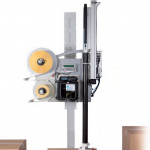
High Performance Labelling System for Warehouse & Logistics
Modularity, High Performance necessary for Warehouse and Logistics System Solutions
View ProductZebra Symbol LS7808 Scanner
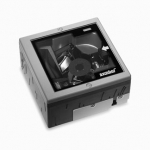
The advanced Symbol LS7808 horizontal slot scanner from Zebra delivers exceptionally high first-pass read rates for faster checkout times
— and better customer service. The Symbol LS7808 represents the latest development in our three decade leadership in designing bar code scanners and our pioneering work in horizontal slot scanner technologies. The omni-directional scan pattern reads the bar code regardless of orientation, eliminating the need to precisely align products to the scanner. Advanced software algorithms reconstruct poorly printed and damaged codes, further increasing performance and speeding customers through the point of sale.
X4Jet Plus
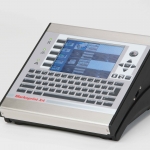
With the new high performance Markoprint X4JET print controller, different inkjet printing technologies can be controlled either simultaneously or alternately. The intuitive input unit of the new high performance Markoprint X4JET plus print controller is a boost to operator convenience. All system parameters can be entered easily and quickly, to be stored and called up later.
View ProductZebra Xi Series Printers
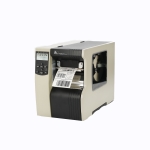
Incredibly robust. Totally reliable. Extremely fast. Designed to deliver the perfect blend of performance and functionality, the robust and reliable Xi series printers are optimised for high-volume operations. Zebra Xi series printers are legendary for their durability, outstanding print quality, fast throughput, long life and unparalleled reliability in demanding applications. These qualities translate into low total cost of ownership – making them an ideal smart investment for businesses with high-volume, mission-critical and speciality labelling applications.
View Product






