

Compact 4 Mobile
The Compact4 Mark II mobile printer is designed for installation on conveyors, forklift trucks and mobile stations. It can operate from a connection to a forklift’s battery and its vibration-proof design makes it the perfect choice for warehousing logistics.
Specifications at-a-glance:
- Direct thermal
- 203 dpi [8 dots/mm], 300 dpi [12 dots/mm] optional resolution
- 5 ips [125 mm/s] maximum print speed
- 4.1″ [104mm] maximum print width
- Serial, USB, LAN, wireless 802.11b/g with WPA2 security protocol (optional)
- PL-Z, PL-I, and PL-B emulations on the DPL versions
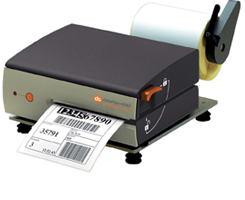
The small footprint size of the Compact4 Mobile Mark II printers, the industrial grade ruggedness, and designed for mobility make it the perfect printer for lift truck and mobile cart printing solutions. Key features are listed below:
- Small but Mighty: The Compact4 Mobile printers have an incredibly small footprint which allows them to be used in applications where space is limited. Their compact size takes up less than half the space of a traditional desktop label printer but with the same duty cycle and strength.
- Rugged: The Compact4 Mobile printers are constructed on a solid cast metal frame and protected with metal die cast covers. Unlike other small printers, the Compact4 series are industrial printers that are built to withstand the rigors of a warehouse or high volume printing application.
- Shock & Vibration ready: The Compact4 Mobile offers a special anti-vibration quick-lock mounting plate, a unique design for forklifts and mobile stations. Runs on 24-48 VDC and connects directly to a forklift battery.
- Media loading is unlike any other printer in the market. The levers are large and easy to manage — so easy that the operation can be done single handed while wearing a leather or latex glove. The paper path is slotted through the side of the printer with no covers to open or clamshells to unlock. Loading media doesn’t get any easier.
- Orientation: The Compact4 Mobile printers can be used in almost any orientation. The design of the printer and special mounting plates allow the printer to be used in its normal upright position, mounted vertically on the wall, or even mounted upside down.
- Software: Labelpoint is a simple yet powerful command language that controls the Compact4 and Nova printers. TeraTerm is an easy to use DOS terminal program for configuring these printers. MP Design is powerful label design software which programs label formats in the printers native command language, Labelpoint. MP Design software comes standard with the printers.
Adobe Reader is required to open and view PDF files. This can be downloaded free from adobe.com.
Available Documents
MP_Compact4MII_final_rev0505101Monarch 9864 Series Tabletop Bar Code Printers
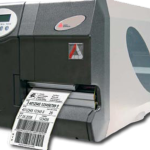
The Monarch 9864TM Tabletop Bar Code Industrial Printer helps you move your merchandise quickly and accurately through the supply chain, by providing high quality, scannable bar codes for your internal tracking, compliance or international shipments.
View ProductSATO | NX Series
The NX is SATO’s universal printer range engineered for the ultimate operator experience, and is skilfully crafted to support new and legacy printing applications across a wide range of verticals that would require a durable and dependable printer for years to come.
View ProductSATO TG3 | Retail Tag & Label Printer
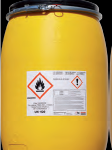
This series of retail SATO printers include a heavy duty print mechanism and cutter assembly which carries on the tradition of durability and performance of SATO solutions.
View ProductHP (Hewlett-Packard)
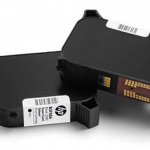
Hewlett Packard is a printhead suitable for marking almost any product at high resolution.
Click on the Direct Sales Button, and contact us today to order your HP inkjet thermal inks.
View Product






