
Auto Parts Labels
Your automotive replacement parts packaging needs a colorful label to attract a buyers attention. Set your brand apart from the competition with unique, well-designed labels that showcase your products. You can use a wide range of materials to add value and style to your label and Weber can help you decide on the best fit of facestock and adhesive to guarantee that your label looks good and performs correctly.
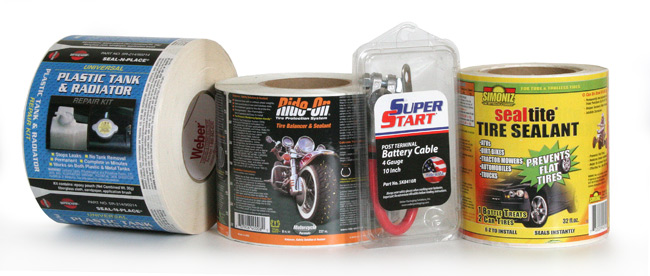
Great looking labels help sell your products.
As in many cases, products are judged and purchased on the strength of their label. And auto parts are no different.
| Radiator Repair Kit LabelThis label goes on a small clamshell container that holds the part for this product. The right and left side of the label are beveled and, when folded down over the sides of the clamshell, act as a closure device. It also ensures the integrity of the package by acting as a tamper-evident seal.Label Size: 5.0″ wide x 5.75″ highFacestock: Gloss White
Print method: Flexo Top Coat: None |
 |
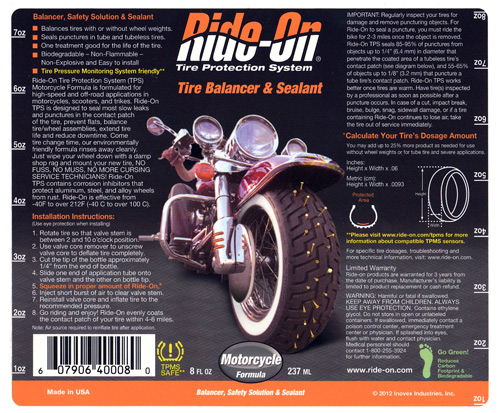
| Tire Balancer & Sealant LabelThe Ride-On Tire Balancer & Sealant label wraps around a round container and is laminated to protect the readability of the text instructions. The unique design features important tire information plus quick-reference measurement call-outs that read in either direction along the sides of the label. That’s handy!Label Size: 5.0″ wide x 6.0″ highFacestock: Gloss White
Print method: Digital Top Coat: Clear Lamination |
 |
POP Automotive Label Tips
Materials:
- Durable, UL-listed vinyl and polyester label facesheet and adhesive combinations make your label work for demanding, long-term applications.
- Overt security and authentication labels that used fracturable materials (destructible labels), messaging adhesives and holographic images keep your brand safe from counterfeiting.
- If your package contains petroleum distillate or other liquids, be sure to chose a printing process and lamination to prevent label damage.
- Flexible label materials are available in case your product comes in a squeezable or flexible container.
Artwork:
- Labels need to be eye-catching to compete on the shelf in automotive after-market stores.
- Clear clamshells are popular options and can be labeled easily.
- You can use your label as a closure device on a box or clamshell package.
Adobe Reader is required to open and view PDF files. This can be downloaded free from adobe.com.
Available Documents
- High Speed Throughput 203 / 305 dpi
- Flexible Connectivity
- User friendly operation
- Low Cost of Ownership
- Unicode Support
- Built in Emulation Language
RFID Smart Labels
Weber is applying its expertise as a leading manufacturer and supplier of pressure-sensitive labels to provide the finest in RFID smart labels. Our innovative method of inserting the RFID inlays fits seamlessly within our label conversion process. And because we manufacture the RFID smart labels ourselves, we’re able to offer RFID media that will maximize performance and minimize costs.
View ProductTC8000 Touch Computer
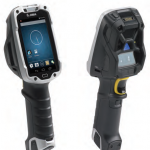
A revolutionary design delivers revolutionary productivity gains…one more hour, per worker, per shift.
Businesses looking for the next innovation in warehouse mobility to boost warehouse productivity, have just found it: the rugged TC8000. What makes the TC8000 so special? Everything
View ProductThe WS2000 Wireless Switch
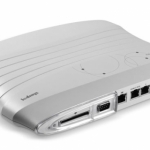
The WS2000 Wireless Switch is a powerful all-in-one solution that simplifies and helps reduce the costs of managing wired and wireless (802.11a/b/g) networks in enterprise branch offices. The integrated router, gateway, firewall, Power-over-Ethernet (PoE) and more eliminate the cost of purchasing and the complexity of managing multiple pieces of equipment. Support for Wi-Fi Multimedia extensions (WMM) and SIP Call Admission Control enables the WS2000 to provide peak performance for even the most demanding applications, including voice and video. The ability to easily and cost-effectively scale to meet growing needs, as well as upgrade to support new security, radio and other standards provides the assurance that the WS2000 will meet your needs today and tomorrow. The WS2000 — enterpriseclass networking functionality, priced for the small to medium-sized business or enterprise branch office.
View ProductSato GZ4e Printer
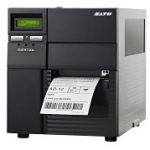
Features